Why MillworkSuite Doesn't Use a Language Model to Read Your Drawings
Engineering · By Brad Hull, Software Engineer — AI · Sep 23, 2026
The question comes up in nearly every technical conversation we have, usually about four minutes in: “So which model is this — is it ChatGPT underneath?”
It isn't. MillworkSuite's drawing intelligence is a detection model we trained ourselves on commercial architectural millwork. It is not a large language model, it is not a general-purpose model with millwork instructions bolted on top, and the distinction is not a marketing one. It changes what the system can promise you, and what it can't.
I want to explain that difference honestly, because it's the part that actually matters if you're running a shop with several estimators, a drafting team, and a GC on the other end of the bid who expects the same number twice.
What the difference actually is
A language model is a generator. Its job is to produce the most plausible continuation of what came before. That is a remarkable capability, and it is the right tool for a genuinely large class of problems. But the mechanism is probabilistic by design: the model is sampling from a distribution of likely outputs. Fluency is the objective. Correctness is a hoped-for side effect of fluency.
A detection model is not doing that. It is answering a narrow, bounded question over a specific region of a specific sheet: is a millwork item present here, what type is it, and where exactly are its boundaries? The output isn't a sentence. It's a class and a location on a page.
That sounds like a smaller ambition. It is. That's the point.
The failure modes follow directly from the mechanism. When our model is wrong, it is wrong in a way you can see: it missed an elevation, or it boxed something that isn't casework, and the box is sitting right there on the sheet for an estimator to reject. When a generative model is wrong about a takeoff, it tends to be wrong fluently — a clean, well-formatted line item that reads exactly like the correct ones and corresponds to nothing on the drawing. There is no box to point at. You find it by re-doing the takeoff, which is the work you were trying to avoid.
A language model
Generates a takeoff
Tall pantry cabinet1 EA
Upper cabinet, 30" H4 EA
Drawer base, 3-drawer2 EA
Sink base, 2-door1 EA
Base cabinet, corner blindReads like the others. Nothing on the sheet matches it.1 EA
When it's wrong: the error looks exactly like a correct line. You find it by redoing the takeoff.
A detection model
Finds each item on the sheet
When it's wrong: the box is on the sheet. Here it boxed a door, which isn't casework, and the estimator rejects it.
Two ways to be wrong. A generator's mistake is fluent and unanchored; a detector's mistake is a box you can point at. Illustrative example.
Same set in, same answer out
For a given model version, the same drawing set produces the same result. Run it Monday, run it again Thursday, run it on a different machine — the detections don't drift.
This is unglamorous and it is the single property I'd defend hardest. It's what makes the output something you can build a business process on top of. You can hand a job to a reviewer and know that what they approved is what the next stage receives. You can re-run a revised set and compare against the previous run to see what genuinely changed, rather than sorting real revisions out from model noise.
Probabilistic generation doesn't give you that for free. Two runs over the same input can differ, and at that point every comparison between runs becomes untrustworthy — you can no longer tell a drawing revision from a sampling artifact.
Detection model
Same set, same version
Monday run
Thursday run
Identical
So when a revised set comes back different, the difference is a real revision.
Generative model
Same set, sampled twice
Run 1
Run 2
Two lines differ
Nothing on the drawings changed, so every comparison between runs is suspect.
Repeatability is what makes runs comparable. Illustrative example.
Every detection has an address
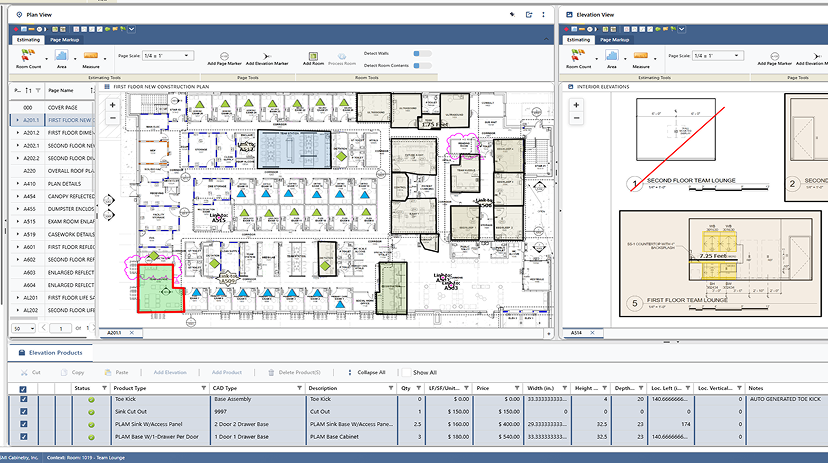
Because the model works on the page rather than on a summary of the page, each thing it finds stays tied to where it found it: the sheet, the room, the elevation marker, the region. Plan, elevation, and line item stay linked in one view.
In MillworkSuite: a detected item stays linked to the plan, elevation and line item it came from, so review happens against the drawing, not against a list.
The practical effect is that verification changes shape. Instead of reading a list and going hunting through the set to confirm it, an estimator reviews items against the exact drawing region each one came from.
That's the difference between a tool that produces an answer and a tool that produces a reviewable answer. On a large commercial set, reviewability is the whole game.
What I'm not claiming
Two things I want to be precise about, because the industry has been oversold and the skepticism is earned.
Detection accuracy is not estimate accuracy. Those are separate measurements and conflating them is how AI vendors lose technical buyers. Our model finds and classifies millwork scope in a drawing set. The estimate is what happens after: your pricing catalogue — your material, labour and overhead rates — applied to scope that your estimator has confirmed, modified, added to or removed. The model does not decide what your shop can build to. It doesn't price risk, evaluate constructability, or judge whether a detail is going to be a problem in the field. It gets a competent human to the point of decision faster.
A narrow model is narrow. Ours is trained for commercial architectural millwork and casework. Hand it something outside that and it should be expected to perform poorly, because it wasn't built for it. A general model would attempt an answer for anything you gave it — which sounds like an advantage until you realise that “will always attempt an answer” and “will tell you when it doesn't know” are opposite properties.
Why this compounds at scale
For a two-person shop, a probabilistic assistant that's usually right is a reasonable trade. The owner reads everything anyway. At fifteen estimators and a drafting team, the arithmetic inverts, in four ways.
Variance multiplies across people. If the same drawing set can produce different scope depending on who ran it and when, you don't have one estimating standard, you have as many as you have seats. Deterministic output gives a larger team a shared baseline — differences between two estimates become differences in judgement, which is a conversation worth having, rather than differences in tooling, which isn't.
Review is the real bottleneck, not generation. Any system can produce a takeoff quickly. The constraint in a busy shop is confirming it. Traceable, per-item output makes review cost scale with the number of items. Untraceable output makes review cost scale with the size of the drawing set — which is to say, it doesn't scale.
Downstream, machines don't accept prose. Approved scope has to land in Microvellum, Cabinet Vision or HOMAG iX as a live job file with layouts matched to your libraries — and eventually as something a machine cuts. Structured output with real geometry maps into that path. Generated text needs a second translation layer standing between the model and the CAD file, and that layer becomes one more place where something invents a dimension no one checks.
Larger organisations have to answer for their tooling. Above a certain size there is an IT review, an insurance position, and sometimes a GC or owner with contractual requirements about project documents. A bounded system with defined inputs, defined outputs and a clear data boundary is a system you can actually answer questions about.
Where language models genuinely belong
None of this is an argument that language models are a dead end. It's an argument about matching the mechanism to the task.
Measurement, counting and localisation are not language problems, and treating them as language problems is how you get confident nonsense. But construction documents also contain a great deal of actual language — specification sections, general notes, finish schedules, inconsistent naming for the same assembly across a set. That is a language problem, and it's where we'd expect a language model to earn its place in this platform, working alongside the detection model rather than in place of it. Different tool, different job, different failure modes to design around.
The estimator still decides
The design principle we keep coming back to is that the system finds and connects; the person confirms and decides. Detection, linkage to source, confidence, and an approval step before anything is priced or pushed downstream — that ordering is deliberate, and a probabilistic architecture makes each of those steps harder to honor.
The system finds & connectsThe estimator decidesOnly after approval
DetectClass, location and confidence for each item on the sheet
Link to sourceSheet, room, elevation marker, region
ApproveConfirm, modify, add or remove scope
PriceYour catalogue: material, labour and overhead rates
Hand off to CADLive job file in Microvellum, Cabinet Vision or HOMAG iX
Generated text → translation layer → CAD fileOne more place where something invents a dimension no one checks.
The ordering is deliberate. Nothing is priced or pushed downstream until a person has approved the scope.
We built a smaller, narrower, more boring model on purpose. In this trade, boring and repeatable beats impressive and variable — every time you have to explain a number to someone who is going to build to it.
Brad Hull is a Software Engineer — AI at MillworkSuite, where he works on the drawing intelligence behind the platform.